

A simple guide to the most useful AI tools you should start using today.
By ZumuniTech – Updated 2025
Your ad will appear here once approved.
📑 Table of Contents
- Introduction
- ChatGPT — Your Everyday AI Assistant
- Grammarly — Make Your Writing Clean and Professional
- Notion AI — Organize Everything Easily
- Canva AI — Simple Design for Everyone
- Adobe Firefly — High-Quality AI Images
- Claude AI — Best for Reading & Research
- Perplexity AI — Faster AI Search
- Microsoft Copilot — Built Into Windows & Office
- Midjourney — Creative AI Artwork
- Descript — Easy AI Video Editing
- Final Thoughts
- Helpful Resources
Introduction
AI is no longer something only experts use. Today, everyone can benefit from it. Moreover, AI tools help you work faster and think more clearly. In addition, most tools are simple and easy to learn. For this reason, this guide will show you 10 useful AI tools for 2025. As a result, you can work smarter every day.
In the same way, these tools give beginners a strong start with technology.
Let’s begin.
1. ChatGPT — Your Everyday AI Assistant

ChatGPT is one of the easiest AI tools. It helps you write, learn, solve problems, and generate ideas. In other words, it works like a smart helper. Besides that, it gives fast and clear answers. Furthermore, it explains difficult topics in simple steps.
Why it’s useful
ChatGPT is great for beginners. For example, it can explain anything in a simple way. Additionally, it can write emails, notes, and study guides. As a result, you save time and avoid confusion.
How to get started
- Open ChatGPT
- Ask your question
- Request examples
- Refine the answer
Therefore, ChatGPT makes your work easier.
Meanwhile, the tool keeps improving.
On top of that, ChatGPT helps you complete tasks much faster.
2. Grammarly — Make Your Writing Clean and Professional

Grammarly checks your writing and fixes mistakes. It helps you write clearly and with confidence. On top of that, it works on email, WordPress, and social media. As a result, you always sound professional.
Why it matters
Good writing builds trust. Therefore, Grammarly is helpful for students, creators, and job seekers. Besides that, it teaches you better writing habits.
How to use it
- Install the extension
- Write normally
- Click suggestions
- Improve your text
Consequently, your writing becomes clean and simple.
Likewise, communication becomes easier.
Additionally, Grammarly makes editing much faster for beginners.
3. Notion AI — Organize Everything Easily
Notion AI helps you manage your notes and tasks. The layout is simple and clean. Furthermore, Notion AI can summarize text or create new content. As a result, staying organized becomes easy.
Why it’s useful
Notion keeps everything in one place. For instance, you can plan your studies or manage projects. In addition, the app uses automation to save time.
How to start
- Open Notion
- Create a page
- Use AI to format or summarize
Therefore, Notion is a great tool for productivity.
Meanwhile, beginners enjoy its simple design.
Besides that, Notion helps you stay focused throughout the day.
🔗 Internal Link
If you want to practice IT skills, you can read my guide on Kali Linux Not Working in VirtualBox? Try These Fixes
4. Canva AI — Simple Design for Everyone
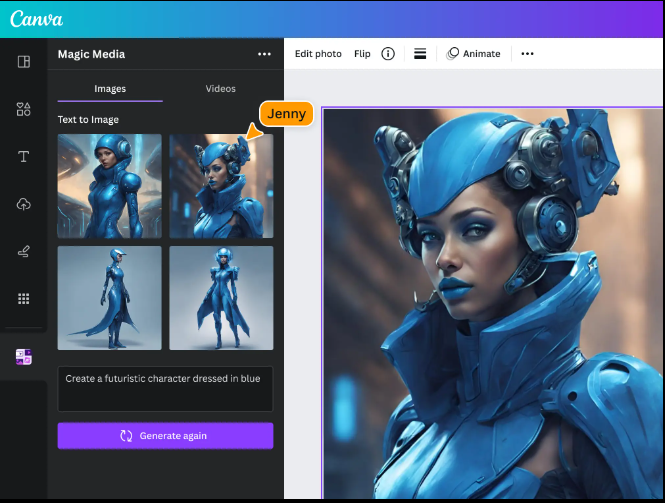
Canva AI helps you create designs easily. You can make thumbnails, posters, and social media posts in minutes. In the same way, you can create images with simple text prompts.
Why it’s great
You don’t need design skills. For example, you can type “blue tech background” and Canva will generate options for you. Besides that, Canva removes the need for advanced tools.
How to use it
- Open Canva
- Choose AI Image Generator
- Describe your image
- Download
Consequently, Canva is perfect for beginners.
Additionally, it saves time when designing.
Moreover, Canva helps creators stay consistent with their branding.
5. Adobe Firefly — High-Quality AI Images

Adobe Firefly creates detailed and clean visuals. The results look real and professional. Moreover, it offers strong lighting and texture options. As a result, your images look premium.
Why it’s powerful
Firefly is great for blogs and branding. After all, high-quality visuals make your content stand out. Furthermore, Firefly improves creative projects quickly.
How to use it
- Open Firefly
- Enter a prompt
- Adjust style
- Export
Therefore, Firefly is a strong tool for graphics.
Likewise, it helps creators look professional.
In addition, Firefly generates consistent styles for your projects.
6. Claude AI — Best for Reading & Research

Claude is great for reading long documents. It explains text in a simple way. Meanwhile, it keeps a friendly tone. Additionally, Claude handles long messages well.
Why it’s useful
Claude can summarize big documents. For example, it can turn a long PDF into short notes. As a result, learning becomes easier.
How to use it
- Paste your text
- Ask Claude to summarize
- Review
Therefore, Claude is perfect for research.
In the same way, it saves time for students.
As a result, Claude helps you understand long content quickly.
7. Perplexity AI — Faster AI Search

Perplexity gives short and accurate answers. It also includes real sources. In other words, it acts like a fast version of Google. Moreover, it reduces search time.
Why people love it
Perplexity gives clear summaries. Additionally, it offers source links for more details. Consequently, you learn faster with less effort.
How to use it
- Type a question
- Read the summary
- Check the sources
Therefore, Perplexity is great for quick learning.
Likewise, beginners find it easy to use.
For this reason, Perplexity is becoming more popular every year.
🔗 Internal Link
If you’re learning Linux, you can read my guide on how to install Kali Linux in VirtualBox.
8. Microsoft Copilot — Built Into Windows & Office
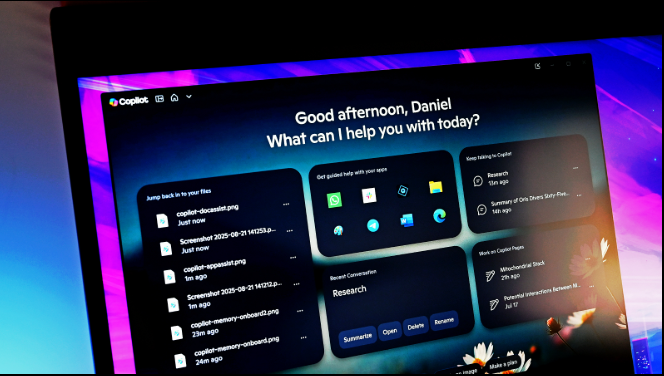
Copilot is already inside Windows 11 and Office. It works fast and feels natural to use. Moreover, it helps you write emails, summarize documents, and build formulas.
Why it’s useful
You don’t need extra tools. On top of that, Copilot can answer questions about your files. As a result, your workflow becomes smoother.
How to use it
- Open Copilot
- Ask your question
- Apply suggestions
Therefore, Copilot saves time every day.
Meanwhile, it keeps improving with updates.
In other words, Copilot helps you finish tasks without switching apps.
9. Midjourney — Creative AI Artwork
Midjourney creates amazing images from short prompts. The style is artistic and unique. Furthermore, the tool offers a lot of creative freedom. For this reason, artists love it.
Why it’s popular
You can create posters, wallpapers, and thumbnails. For instance, brands use Midjourney for unique visuals. In addition, it helps beginners create beautiful artwork.
How to start
- Join Discord
- Type /imagine
- Describe your idea
- Download
Consequently, you create stunning art with little effort.
Likewise, it inspires new design ideas.
Moreover, Midjourney helps creators stand out online.
10. Descript — Easy AI Video Editing
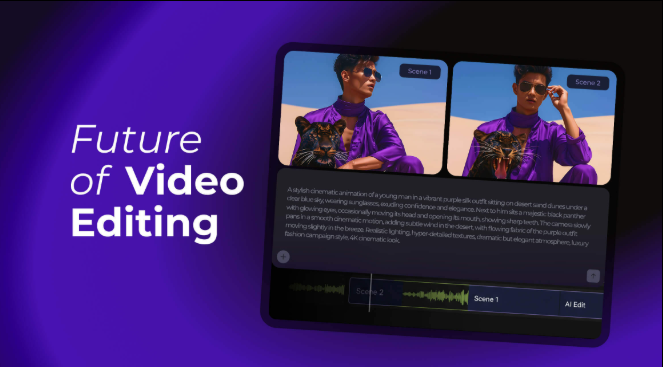
Descript makes video editing simple. You edit by changing text. Additionally, Descript removes mistakes and adds subtitles.
Why it’s amazing
You do not need advanced editing skills. For example, deleting a sentence also deletes that part of the video. Similarly, beginners find video editing easier with Descript.
How to use it
- Upload a video
- Wait for transcription
- Edit the text
- Export
Therefore, Descript is perfect for fast editing.
In the same way, it helps you create clean videos quickly.
Furthermore, Descript speeds up your entire editing workflow.
Final Thoughts
AI is now part of daily life. Moreover, these tools help you work faster and easier. In the end, you do not need every tool. Just choose the ones that match your needs. As a result, AI becomes a helpful partner in your daily tasks.
Additionally, learning these tools improves your skills for the future.
Helpful Resources
https://openai.com/chatgpt
https://grammarly.com
https://www.notion.so
https://copilot.microsoft.com


[…] If you want to explore more beginner-friendly tools like chatbots, see our guide on Top 10 AI Tools Everyone Should Use in 2025 […]